iPhone Water Damage / Liquid Exposure: How to Approach Board-Level Diagnosis
On a liquid-exposed iPhone the fault is rarely a single part — corrosion, short circuits and sensor lines. Here is the board-level diagnosis approach to liquid damage.
On a liquid-exposed iPhone the fault is rarely a single part: liquid leaves traces at many points on the board as corrosion (oxide eating fine traces and connectors), shorts to ground, and sensor-line damage. That's why a "swap the part" mindset usually fails on liquid cases.
This guide is not a drying/cleaning recipe — it explains the systematic approach of board-level diagnosis to liquid damage: where to look, in what order. The goal is to narrow down where the damage is with measurement, instead of blindly swapping modules/chips.
1. Start with a visual corrosion inspection
The first step in liquid damage is mapping corrosion under a microscope. Commonly affected areas: the board's outer edge (button, connectors), around the audio module, the camera connectors, and around storage (NAND).
The type of liquid changes the damage: salt water, coffee, and mineral-rich water corrode at different speeds and severities. This inspection identifies the "suspect region" before any measurement — the rest of the diagnosis is built on this map.
2. Read the current signature (without pressing power)
Connect to a bench power supply and, without pressing the power button, watch the current it draws:
- Abnormally high current + heat → a line has shorted to ground (a corroded capacitor or line-to-line short).
- No current / very low → the input line is broken (connector, protection-element side).
- Normal low (idle) current → no heavy short; diagnosis can move to the sensor/signal lines.
Finding the heating area with a thermal camera/finger pinpoints most shorts. If current/heat is very high, you hunt the short first, before powering the board.
3. Short hunting (diode mode + divide-and-measure)
Corrosion most often causes shorts. In the multimeter's diode mode you measure between the main power line and ground; a very low reading near zero is a short suspicion. If a short is found, you narrow the source with divide-and-measure:
- Disconnect the battery → did current drop? (battery-path side)
- Remove the input protection/modules one by one → on which does current drop?
- Measure the fine lines (data pairs) in the corroded area to ground, one by one.
Remember: the value read on the board belongs to the whole circuit tied to that point — diode mode is a first filter; a definitive diagnosis comes from trace-following.
4. Don't forget the sensor lines
The insidious side of liquid: even when the main rails look fine, the fine sensor/data lines are corroded. Two examples common in the curriculum:
- Temperature-sensor lines: Corrosion damages these fine lines; the system reads wrong (or no) temperature and throttles the fan/performance for safety. So "fan roaring / device slow" is often a sensor-data problem, not the part itself.
- Camera/audio control lines: Fine I2C/clock lines or connector corrosion → symptoms like "black camera" or "no speaker."
That's why, before replacing a module, the line and connector feeding it are inspected.
5. Why "fast but systematic"?
The two most common mistakes on liquid cases: (1) swapping a module/chip before cleaning the corrosion and clearing the board side — the new module connects to the same corroded line and doesn't fix it; (2) jumping straight to software/NAND on seeing a boot loop — when the cause may be a corroded supply/data line.
The systematic order (corrosion map → current signature → short hunt → sensor/signal lines) both finds the right point and avoids wasted parts. Which line should read what, and the repair decision, is the depth that comes with training.
Note: This guide focuses on diagnosis; post-liquid intervention and repair decisions depend on the device's condition. Topics like iCloud/activation lock are outside diagnosis and a legal/ethical boundary.
How this fault looked on the bench
Real repairs from İlham's bench, published on Facebook 2021–2025. The text is the original post, unedited.
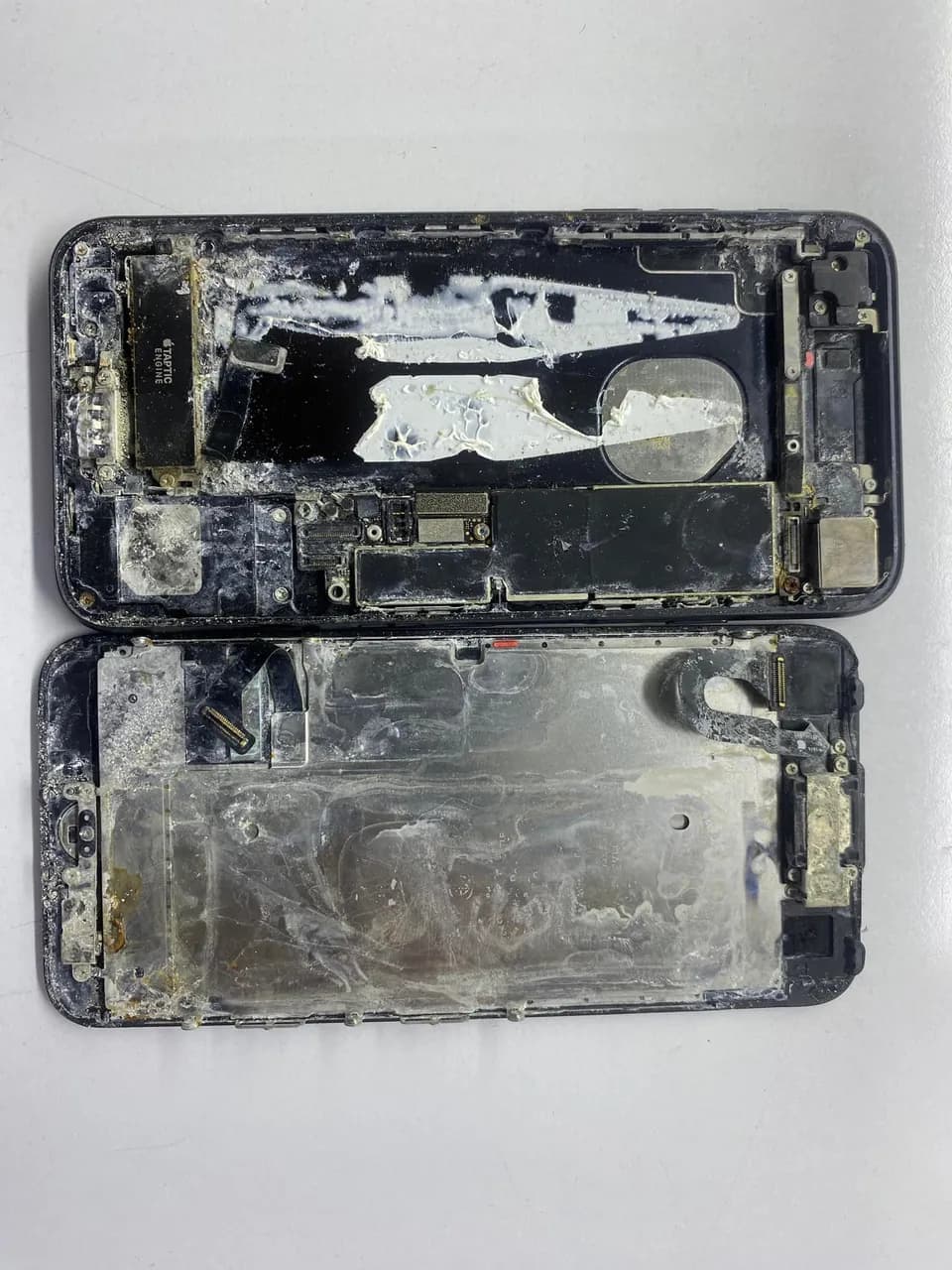
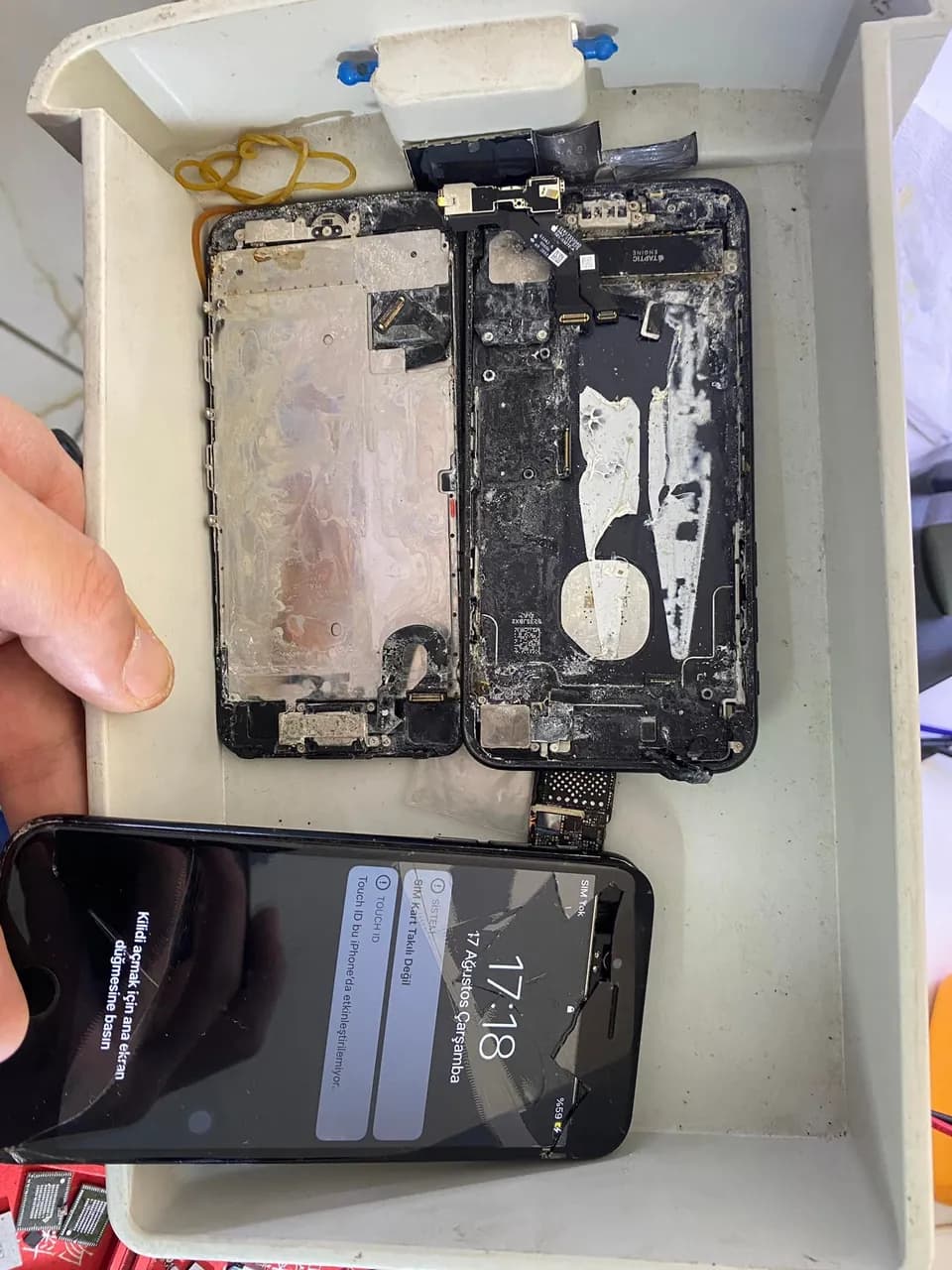
iPhone 7 sıvılı içindeki bilgiler önemliymiş saglam bir şekilde kurtardık. Aslında bunu paylaşma sebebim farklı dikkat ediyorum bayağıdır adam herhangi bir cihazın resmini paylaşıyor altına da saçma sapan uzun uzun yazılar yazıyor yorumlar beğeniler havada uçuşuyor deyilecek çok şey var da amma ben ağzımı bozmayacam çünkü herkes kendisini çok iyi biliyor
Sık sorulanlar
My iPhone fell in water — is rice enough?
Rice is neither a diagnosis nor a repair, and corrosion can keep progressing inside meanwhile. In a board-level approach the work is to map corrosion with visual inspection + measurement and diagnose short/sensor damage. Most important: don't keep trying to power it on — take it for professional diagnosis.
It seems to work — does that mean there's no problem?
Not necessarily. Liquid corrosion progresses over time; a device working today can fail days or weeks later due to corroded fine lines. Corrosion inspection and cleaning prevent problems that surface later.
Fan/heat or camera/audio issue — should I replace that part?
On a liquid case, first check the line and connector feeding that part for corrosion. Often the part is fine; what's broken is the corroded sensor/data line. Replacing the part without verifying the line may not fix it.
On a liquid device, does boot loop mean software?
Not necessarily. If corrosion damaged the NAND supply or data line, the cause is hardware. On a liquid case, the supply/data leg is measured before jumping straight to software in a boot loop.
- · Board-level diagnosis methodology — corrosion inspection, short hunting and trace-following
- · USTA Academy repair curriculum — liquid damage, corrosion and sensor-line diagnosis module
- · USTA Academy repair curriculum — current signature and diode-mode short hunting
Want to learn this systematically?
AkademiUsta · Apple Board-Level Repair — 6 Modules · 80 Days. Module 1 (8 days) is completely free — no time limit, no credit card.
This topic in the program · Module 1 · Day 7Read the visual evidence and make the rework decisionStart FreeSource: USTA Academy repair curriculum — liquid-damage corrosion/short diagnosis approach (teaser)